How to Use Stickers for Local Business Marketing
TLDR
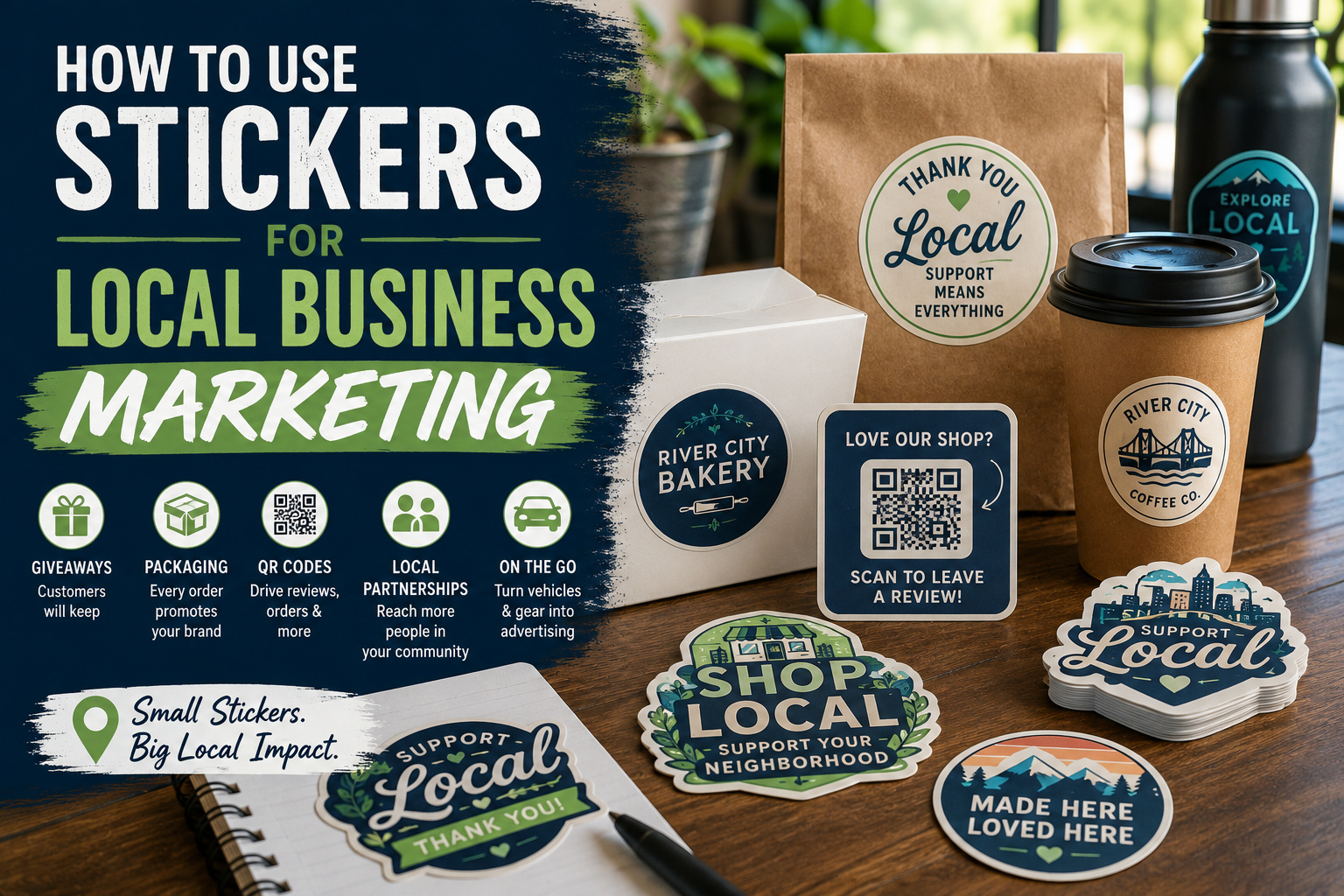
- Give customers stickers they will want to place on bottles, laptops, notebooks, and other visible surfaces.
- Use packaging stickers to turn every purchase into a branded interaction.
- Add QR code stickers that lead to menus, booking pages, reviews, directions, or special offers.
- Create local designs that reference your city, neighborhood, landmark, or community.
- Partner with nearby businesses to distribute stickers beyond your own location.
- Track campaigns with unique links, QR codes, or coupon codes.
Local marketing is built on repetition. A customer sees your sign, passes your vehicle, notices your bag, receives a recommendation, or spots your logo on someone else’s water bottle. No single interaction needs to do all the work.
Stickers support that repetition without requiring a large advertising budget. They can travel with customers, finish product packaging, promote a seasonal event, direct people to a review page, or give loyal customers a small way to represent a business they like.
The best stickers for local business marketing are not miniature flyers packed with phone numbers, slogans, social handles, and fine print. They are clear, useful, and designed for a specific job.
Why Stickers Work for Local Business Marketing
Digital advertising is useful, but local customers also interact with physical objects every day. They carry coffee cups, open bakery boxes, drive through town, attend community events, visit neighboring stores, and receive mail at home.
Stickers give a business a way to appear in those spaces.
A sticker can function as:
- A portable logo
- A package seal
- A customer giveaway
- A review request
- A loyalty reward
- A vehicle message
- A product label
- An event keepsake
- A directional sign
- A referral tool
Physical promotion can also work alongside online marketing. USPS describes direct mail as part of a broader campaign that can connect physical materials with digital calls to action. Its Every Door Direct Mail program allows businesses to target particular neighborhoods without maintaining a list of individual names and addresses.
That same principle applies to stickers. The sticker attracts attention in the physical world, while a website, QR code, map listing, or booking page gives the customer a next step.
Start With One Goal Per Sticker
Before working on the design, decide what the sticker should accomplish.
Do you want someone to:
- Remember the business?
- Visit the store?
- Scan a menu?
- Book an appointment?
- Reorder a product?
- Leave an honest review?
- Follow an account?
- Redeem an offer?
- Attend an event?
- Display the sticker somewhere visible?
A logo giveaway and a review-request sticker should not use the same design. The giveaway should be attractive enough to keep. The review sticker should make the action immediately clear.
A practical starter set for many businesses includes:
- One logo or mascot sticker for customers
- One packaging sticker or roll label
- One QR code sticker with a specific action
Those three pieces cover brand visibility, purchase presentation, and customer follow-up without making the campaign difficult to manage.
Give Customers Stickers Worth Keeping
A free logo sticker can extend your local business marketing beyond the point of sale. But customers will only use it if the design feels like something they actually want.
A plain corporate logo may work when the brand is already well known. A newer business may get better results from a design with more personality.
Try:
- A business mascot
- A local phrase
- A neighborhood landmark
- A simple illustration related to the product
- A funny line customers already associate with the business
- A limited seasonal design
- A “shop local” badge
- A city or state-themed version of the logo
- A design created with a local artist
For example, a coffee shop could make a sticker featuring its signature mug and the neighborhood name. A bike shop might use a trail, mountain, or local route. A pet groomer could turn a popular shop dog into a mascot.
The business name should still be visible, but it does not need to dominate the design.
You can use custom vinyl stickers for customer giveaways, packaging inserts, event handouts, laptops, water bottles, notebooks, and other everyday branding uses.
Add Stickers to Every Customer Order
Packaging is one of the easiest places to use stickers because the customer has already chosen to buy from you.
Use packaging stickers to:
- Seal tissue paper
- Close a paper bag
- Brand a plain box
- Hold a receipt envelope closed
- Add a thank-you message
- Identify a flavor, scent, or size
- Mark a product as handmade or locally produced
- Promote an upcoming event
- Include basic care instructions
The sticker does not need to turn a plain bag into complicated luxury packaging. Its job is to make the order feel consistent with the business.
A bakery might use a round seal on pastry boxes. A candle maker may need scent labels. A bookstore could close tissue paper with a small illustrated sticker. A repair shop might place a service reminder on equipment or paperwork.
When the same design needs to be applied repeatedly, custom roll labels are usually more efficient than individually cut giveaway stickers. YouStickers positions roll labels for product packaging, jars, bottles, boxes, bag seals, QR codes, and repeated application workflows.
Use QR Code Stickers for a Clear Next Step
QR code stickers can connect a counter, package, vehicle, receipt, table, or storefront to an online destination.
Useful destinations include:
- A Google review page
- A menu
- An appointment scheduler
- An online ordering page
- A product reorder page
- Event registration
- A loyalty program
- Store directions
- A digital coupon
- A mailing list
- A portfolio or gallery
- Care instructions
Add a short call to action that tells people what will happen after they scan.
Good examples include:
- Scan to order ahead
- Scan to book an appointment
- Scan for this week’s menu
- Scan for care instructions
- Scan to reorder
- Scan for event details
- Scan to leave a review
“Scan me” is less useful because it gives the customer no reason to act.
Keep the code large enough, preserve clear space around it, and test the printed sticker with several phones before ordering a large quantity. YouStickers recommends keeping the actual QR code around one inch square or larger for most printed applications, with more space when the sticker also contains text or artwork.
Ask for Reviews Without Offering Rewards
A review-request sticker can be placed on a receipt, counter display, takeout bag, thank-you card, product package, or service folder.
Google allows businesses to create and share a direct review link or QR code. Google specifically suggests placing the QR code in a store, on receipts, and in thank-you communications.
Keep the request neutral:
- Tell us about your visit
- Share your experience
- Leave an honest review
- Your feedback helps our local business
Do not offer a discount, free item, contest entry, or other reward in exchange for a Google review. Google prohibits reviews influenced by discounts, free products, payment, or other incentives.
You can offer a loyalty reward for making a purchase or returning to the store. Just keep it separate from the review request.
Turn Customers Into Local Brand Ambassadors
Some businesses have customers who enjoy showing where they shop, eat, train, or spend time.
This works especially well for:
- Breweries
- Coffee shops
- Restaurants
- Gyms
- Bike shops
- Outdoor stores
- Tattoo shops
- Record stores
- Bookstores
- Hobby shops
- Salons
- Auto businesses
- Farmers market vendors
Give these customers a sticker that signals membership in the community rather than simply displaying an advertisement.
Possible wording includes:
- Regular at [Business Name]
- Fueled by [Business Name]
- Local since [Year]
- [Neighborhood] Coffee Club
- [City] Book People
- I Found It at [Business Name]
- Support Your Local [Business Type]
- Made in [City]
- [Business Mascot] Approved
The strongest local business marketing often gives the customer a role. Instead of asking them to carry an ad, the sticker lets them express something about themselves.
Put Bumper Stickers on Business and Staff Vehicles
Vehicle stickers can create repeated local visibility because they move through the same neighborhoods where the business operates.
Good bumper sticker messages are short enough to understand from a distance.
Use:
- The business name
- A short service description
- A memorable slogan
- A large phone number, when calls are the primary action
- A simple website
- A local phrase
- A bold mascot
- A straightforward “Serving [Area]” message
Avoid placing a dense list of services on the sticker. A driver has only a few seconds to notice it.
For longer horizontal messages and outdoor vehicle use, custom bumper stickers are a better fit than shrinking the same design onto a small die-cut sticker. YouStickers offers bumper stickers in common horizontal sizes as well as custom sizes and shapes.
Ask staff before giving them stickers for personal vehicles. A free sticker should remain optional, especially when it contains strong promotional language.
Use Window Stickers Carefully
A storefront window can support local business marketing without covering the glass with permanent signs.
Window stickers can display:
- Store hours
- A logo
- A QR code
- Pickup instructions
- A seasonal promotion
- A new-product announcement
- An event date
- A short “Open” or “Order Here” message
Clear stickers can create a printed-on-glass appearance when the artwork has enough contrast. White vinyl may be easier to read when the background behind the glass changes throughout the day.
Clear stickers can work well on windows and glass when the surface underneath should remain visible. But clear material is not always the right choice. Pale colors and white areas can lose visibility if the design is placed over a busy or dark background.
For temporary sales or seasonal window campaigns, consider whether removable adhesive is more appropriate. For permanent branding, stronger adhesive may make more sense. Always test the actual glass or coated surface before installing a large campaign.
Include Stickers in Local Direct Mail
A local mail campaign does not have to be limited to a postcard.
You can include a small peel-off sticker or design the mailpiece so the sticker feels like a useful extra rather than another coupon.
Ideas include:
- A calendar reminder sticker
- A refrigerator sticker with a phone number
- A service-date reminder
- A mascot sticker for families
- A seasonal shop-local design
- A QR code sticker for online ordering
- A coupon sticker with a unique code
USPS Every Door Direct Mail can target selected carrier routes and send postcards, menus, flyers, or coupons to every address in a defined area without requiring individual names and addresses.
Before building a sticker into a mailpiece, confirm the final piece meets the mailing service’s current size, weight, thickness, and preparation rules.
Partner With Other Local Businesses
Sticker distribution becomes more effective when it extends beyond your own counter.
Look for businesses that serve a similar customer without directly competing with you.
Examples include:
- A coffee shop and bookstore
- A bakery and florist
- A gym and smoothie bar
- A pet store and groomer
- A bike shop and outdoor retailer
- A salon and clothing boutique
- A wedding photographer and venue
- A brewery and food truck
- A mechanic and car wash
- An artist and gift shop
Each business can include the other’s sticker in bags, display a small stack near the register, or create a shared design for a neighborhood event.
A co-branded sticker should feel balanced. Do not squeeze six unrelated logos onto one small shape. Use a shared message, neighborhood identity, map, or event design and keep the sponsor marks secondary.
Create Local-Pride Sticker Designs
A local business has access to design ideas that national brands cannot use as naturally.
Consider:
- A recognizable skyline
- A local mountain, river, lake, or trail
- A neighborhood nickname
- Local architecture
- A regional animal or plant
- A town festival
- A city color palette
- A familiar road sign
- A local food or phrase
- A simplified map
Use original artwork or properly licensed assets. Do not assume that every city logo, sports symbol, landmark illustration, or university mark is free to reproduce commercially.
Local-pride stickers work best when the business connection remains clear but does not overpower the design.
For example, a restaurant may create a city-themed sticker in its established illustration style and place a small logo beneath it. That is more likely to be displayed than a sticker containing only the restaurant’s address.
Use Stickers at Markets, Festivals, and Community Events
Events give local businesses a chance to put stickers directly into customers’ hands.
Use stickers for:
- Free booth giveaways
- Purchase incentives
- Children’s activity sheets
- Staff identification
- Event badges
- Sponsor recognition
- Swag bags
- Scavenger hunts
- Loyalty programs
- Limited-edition event designs
- QR code schedules
- Social media prompts
A sticker sheet can work especially well for family events, festivals, community fairs, and businesses with several small icons or characters. Custom sticker sheets group multiple peelable designs on one sheet and are easier to count, store, and hand out as a complete set.
Do not place your entire marketing budget into generic logo stickers for a one-day event. Create at least one design tied to the location, date, season, or event. That makes the sticker feel like a keepsake.
Build a Sticker-Based Loyalty Program
A loyalty card remains one of the simplest sticker marketing ideas for repeat customers.
The customer receives one small sticker for each visit or qualifying purchase. After filling the card, the customer receives a clearly defined reward.
This works for:
- Coffee shops
- Bakeries
- Ice cream stores
- Children’s programs
- Fitness studios
- Salons
- Car washes
- Pet services
- Bookstores
- Farmers market vendors
Keep the rules simple. Customers should know:
- What earns a sticker
- How many stickers are needed
- What the reward is
- Whether the card expires
- Whether lost cards can be replaced
Use small stickers that are difficult to copy casually. A custom shape, rotating color, tiny logo, or changing seasonal design can help.
Match the Sticker to the Business
Different businesses need different sticker campaigns.
Restaurants and Coffee Shops
Use cup stickers, takeout seals, QR code menus, loyalty stickers, seasonal drink labels, and mascot giveaways.
Contractors and Home Services
Use service reminder stickers, equipment labels, QR code review requests, leave-behind logo stickers, and vehicle stickers.
Salons and Wellness Businesses
Use appointment reminders, aftercare instructions, product labels, referral stickers, and booking QR codes.
Retail Stores
Use bag seals, price or product labels, local-pride giveaways, new-product stickers, and event handouts.
Food Makers and Farmers Market Vendors
Use product labels, flavor stickers, “made locally” seals, QR code reorder stickers, and customer freebies.
Gyms and Fitness Studios
Use member stickers, challenge badges, water bottle stickers, class-pass rewards, and event stickers.
Pet Businesses
Use pet-themed giveaways, grooming reminder stickers, treat bag seals, vehicle decals, and review QR codes.
The most effective idea is usually the one connected to a real customer interaction that already happens.
Design Stickers for Quick Recognition
Local marketing stickers are often seen from a distance or for only a few seconds.
Keep the design simple:
- Use one primary message.
- Make the business name readable.
- Use high contrast.
- Avoid thin lettering.
- Limit small text.
- Keep QR codes away from the cut edge.
- Design at the final printed size.
- Choose a shape that fits the artwork.
- Leave enough space around the logo.
- Test the design on the intended surface.
A sticker that looks clean at six inches wide may become unreadable at two inches. Print the artwork on ordinary paper at actual size before approving it.
For giveaway stickers, two to three inches is a useful starting range for many logos and simple illustrations. Detailed artwork, QR codes, and distance viewing may require a larger size. YouStickers recommends sizing QR code stickers generously rather than chasing the smallest possible format.
Track Sticker Marketing Results
Stickers can be tracked more accurately than many businesses assume.
Use:
- A unique QR code
- A dedicated landing page
- A short campaign URL
- A sticker-only coupon code
- A separate phone extension
- A campaign question at checkout
- A different code for each event or partner
For example, a coffee shop could use MARKET10 on stickers handed out at the farmers market and BOOKS10 on stickers distributed through a neighboring bookstore.
Track:
- Scans
- Visits
- Redemptions
- Review activity
- Email signups
- Repeat orders
- Cost per response
- Stickers distributed
A dynamic QR code can be helpful for campaigns because its destination can sometimes be changed after printing. The tradeoff is that many dynamic QR services require an active paid account. A static code is safer for permanent pages that are unlikely to change.
Start Small Before Ordering in Bulk
Larger quantities usually reduce the cost per sticker, but that saving disappears if the campaign changes before the stickers are used.
Begin with a smaller order when:
- The design has not been tested.
- The offer may change.
- The QR destination is temporary.
- The business is rebranding.
- The event attendance is uncertain.
- The contact information may change.
- You are testing several designs.
Order larger quantities when:
- The logo is stable.
- The sticker has performed well.
- The use is predictable.
- The design is evergreen.
- The business has storage space.
- You know how quickly the stickers are distributed.
A bulk order should be based on expected use, not only the lowest unit price. Outdated stickers with an expired offer or broken QR code are not a bargain.
Common Sticker Marketing Mistakes
Trying to Say Too Much
A sticker is not a brochure. Use one message and one action.
Using Tiny Contact Information
A phone number or website that cannot be read at the final size is not helping the campaign.
Giving Away an Unappealing Design
Customers are more likely to use a local illustration, mascot, joke, or attractive badge than a plain sales message.
Placing Permanent Stickers on Temporary Surfaces
Match the adhesive to how long the sticker should remain and who owns the surface.
Using QR Codes Without Context
Tell customers what the code opens.
Linking to the Homepage by Default
Send people directly to the menu, booking page, review form, offer, or event they need.
Offering Incentives for Reviews
Ask every customer for an honest review without tying the request to a reward.
Skipping Surface Preparation
Dust, moisture, wax, grease, and texture can weaken adhesion. Clean and dry the surface before application.
Failing to Ask Permission
Do not place promotional stickers on public property, signs, utility boxes, another business’s property, or customer belongings without permission.
A Simple 30-Day Sticker Marketing Plan
Week 1: Choose the Campaign
Pick one goal, such as more reviews, more repeat purchases, or better visibility at an upcoming event.
Week 2: Create and Test the Design
Prepare the artwork, print a paper sample at actual size, test any QR code, and place a mockup on the intended surface.
Week 3: Distribute the Stickers
Use the stickers consistently at checkout, in orders, at events, or through partner businesses.
Week 4: Measure the Response
Check scans, coupon use, reviews, website traffic, or repeat visits. Ask staff which sticker customers chose and which questions came up.
Use what you learn to improve the next order.
Make Each Sticker Do a Real Job
Stickers are most useful when they connect to the way a local business already serves its customers.
Place a logo sticker in a takeout bag. Add a review QR code to a receipt. Seal a market purchase with a local design. Put a clear ordering link near the counter. Give regular customers a sticker they would genuinely place on a water bottle or laptop.
The goal is not to cover the neighborhood with logos. It is to create small, repeated interactions that make the business easier to remember, recommend, and revisit.
That is where stickers become more than decoration. They become part of the local marketing system.